Why Google Maps Doesn’t Work in Korea — and What to Use Instead
Quick Answer
Google Maps has no turn-by-turn driving directions in South Korea, limited walking directions, and thin transit data. The cause is a legal restriction on exporting Korean mapping data abroad, not a technical gap Google could simply fix. Use Naver Map for general navigation and English support, or KakaoMap for real-time transit detail. Both are free and neither needs a Korean phone number.
The Full Answer
Every guide to Korea tells you to download Naver Map or KakaoMap. Almost none explains why, and the why matters — because it tells you what will and will not work, rather than leaving you to discover it at a junction.
Google Maps is not broken in Korea. It works fine for searching places, reading reviews and seeing where things are. What it cannot do is give you driving navigation, because detailed Korean map data cannot be exported to servers outside the country. That restriction is a national security measure and it has been in place for years. Google has repeatedly requested an exemption; it has not been granted.
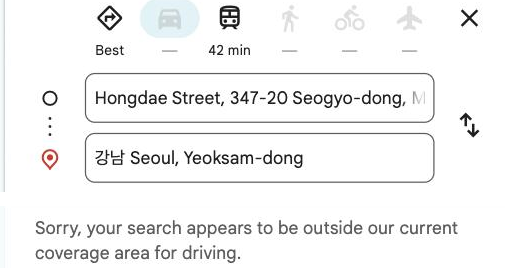
The practical consequence: the Directions button for driving simply does not work. Walking directions are limited. Transit exists but is bare-bones and lacks live data.
That is a different problem from “the app is a bit worse here”, and it changes what you should install before you land.
What Actually Fails
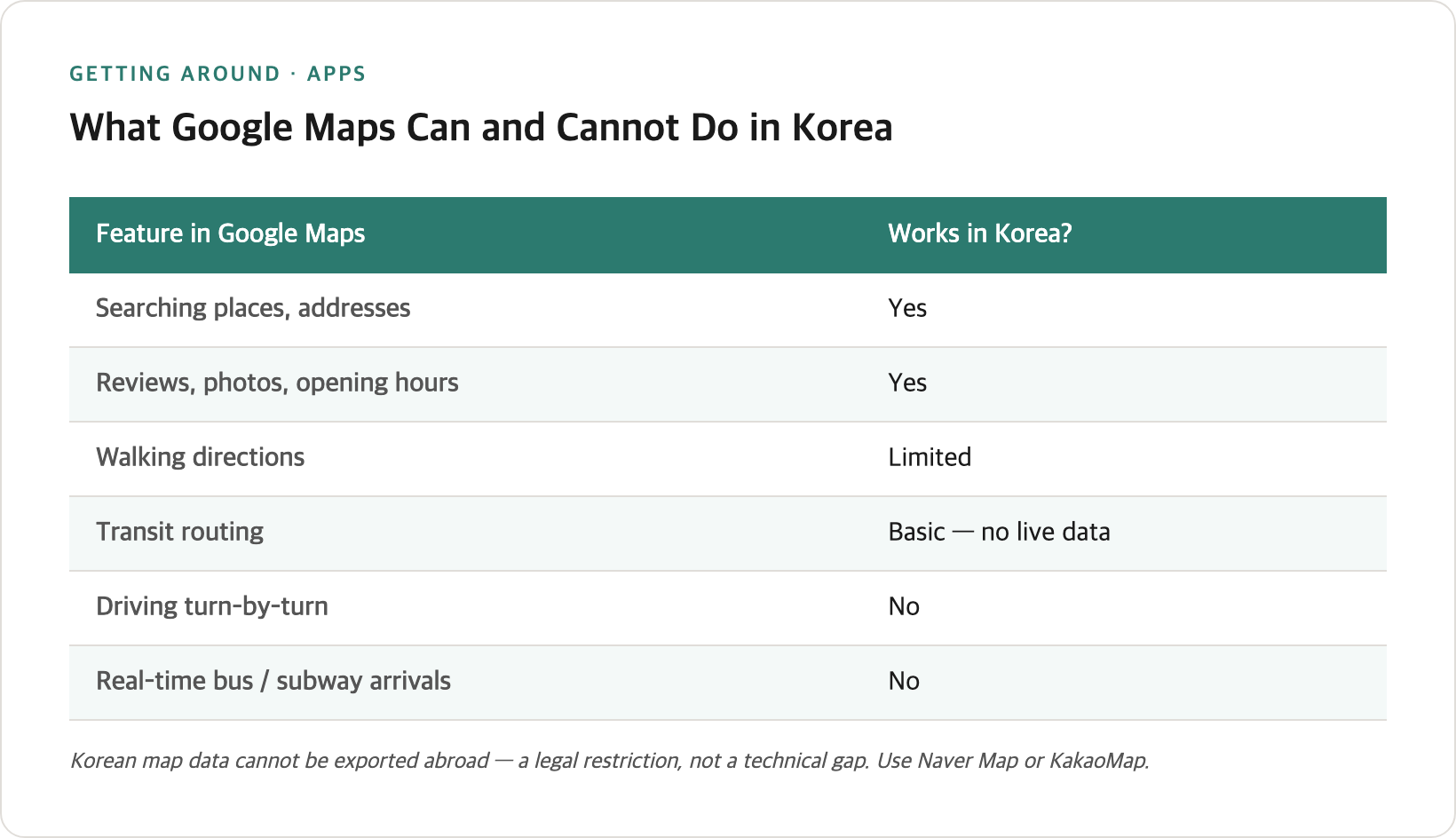
| Feature in Google Maps | Works in Korea? |
|---|---|
| Searching places, addresses | Yes |
| Reviews, photos, opening hours | Yes |
| Driving turn-by-turn | No |
| Walking directions | Limited |
| Transit routing | Basic, no live data |
| Real-time bus/subway arrivals | No |
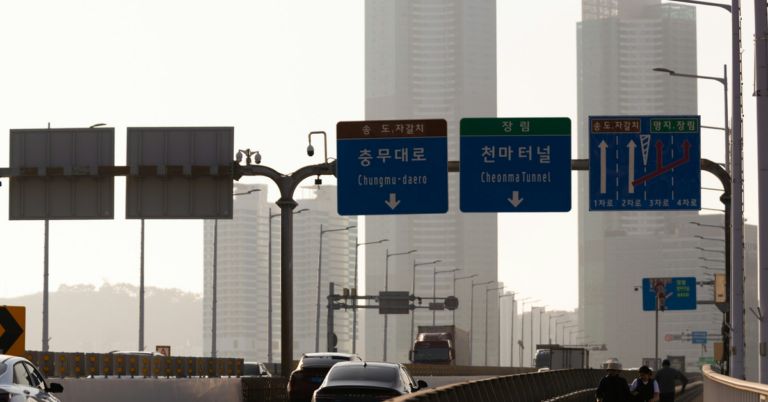
Local tip — The failure is silent. Google Maps will show you a place and a straight-line distance without telling you it cannot route you there by car. If you are renting a vehicle — on Jeju, for instance — plan on the Korean apps from the start rather than discovering the gap on the road. Renting the car itself is a separate hurdle: which driving permit Korea actually recognises is narrower than most English guides describe.
Naver Map vs KakaoMap
Both are free, both work without a Korean phone number, and both have English interfaces. They are not identical.
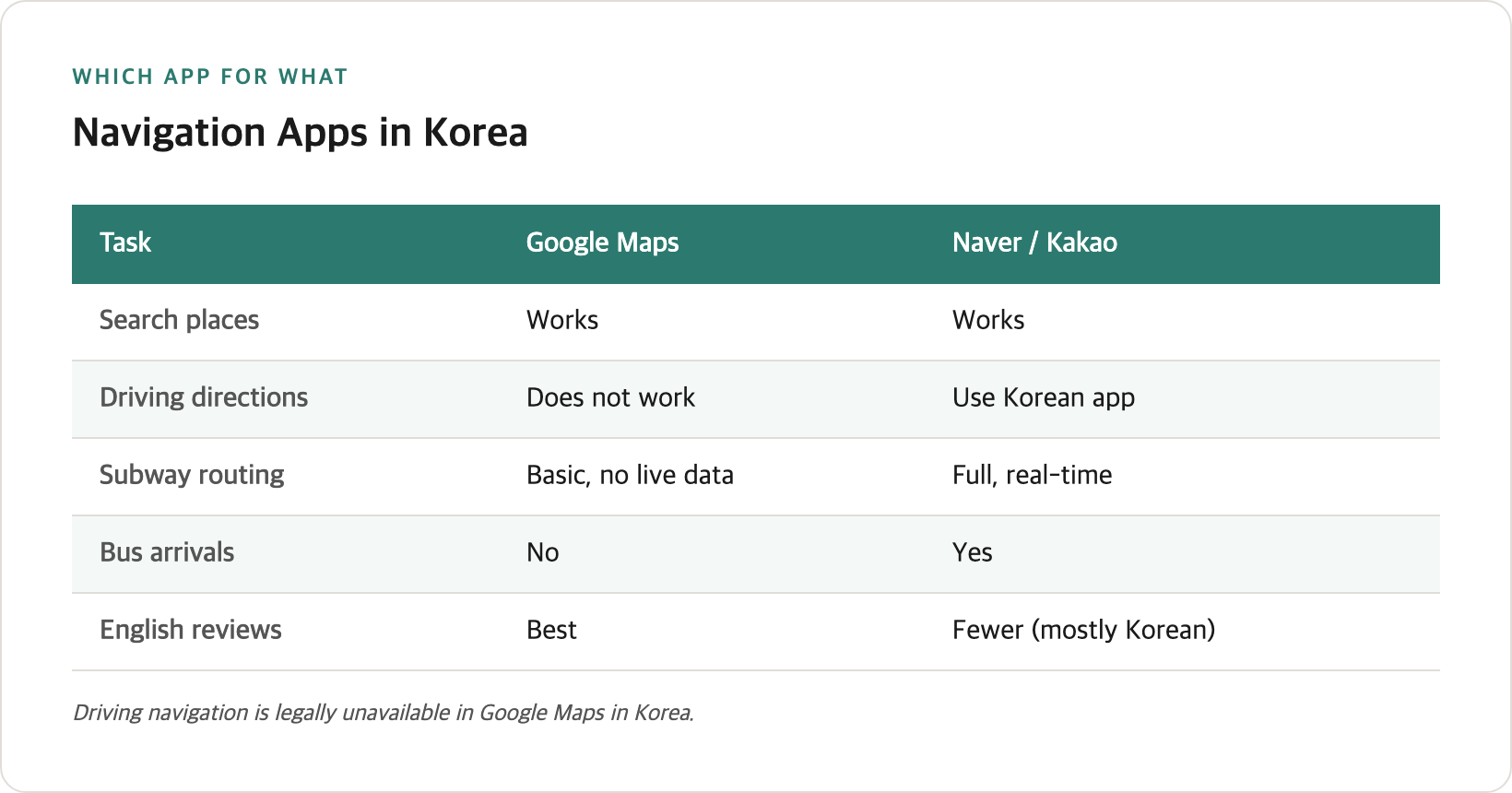
| Naver Map | KakaoMap | |
|---|---|---|
| English support | Strongest — menus, voice navigation, pop-ups | Good, slightly less complete |
| Other languages | Chinese, Japanese | Fewer |
| Transit detail | Solid | Stronger |
| Real-time bus tracking | Yes | Better |
| Restaurant reviews | Good | Strong |
| Overall for a first visit | Recommended | Excellent second app |
Local tip — KakaoMap tells you which car number to board for the fastest transfer at your destination station, and counts down subway arrivals in seconds rather than minutes. On a tight connection that is the difference between making it and watching the doors close. Naver does not surface this as clearly.
Local tip — Install both. They are free, they take a minute each, and they disagree often enough that a second opinion is useful — particularly on bus routes, where one will occasionally suggest a service the other omits.
Setting Up in English
Both apps default to Korean based on your device region.
- Naver Map: open the menu, find the language setting, choose English. Menus, search results and voice navigation all switch
- KakaoMap: language setting is in the app settings; some deeper screens remain partly Korean
Place names are searchable in English in both, though results are more reliable if you paste the Korean name when you have it. Copying a Korean address from a hotel booking into the search box works well.
The Address Problem Nobody Warns You About
Korea runs two parallel address systems, and both are in active use.
| System | Form | Where you see it |
|---|---|---|
| Road name (도로명) | Street + building number | Official documents, signage, newer listings |
| Lot number (지번) | District + parcel number | Older businesses, taxi drivers, some bookings |
A restaurant’s website may list one, your hotel booking the other, and a taxi driver may recognise only the second.
Local tip — When an address fails to resolve, try the other system before assuming the place has closed. Both Korean apps accept either format, and both will usually offer the alternative form once they find the location — which is the fastest way to get a string a taxi driver will recognise.
I checked how the two apps handle mixed-format addresses in July 2026: pasting a road-name address into either returns the lot-number equivalent on the place card, which you can then copy.
Practical workaround: search the place by name rather than address wherever possible. Korean apps have far denser business listings than Google does, and a name search sidesteps the format problem entirely.
When You Still Want Google Maps
It is not useless. Keep it for:
- Saving places in advance. Starred lists sync across devices and are easy to build before the trip
- Reading reviews in English. Korean apps carry far more reviews, but almost all in Korean
- Getting your bearings. The satellite view and general layout are fine
Use it to decide where to go, and a Korean app to work out how.
What You Need to Know
-
The restriction is legal, not technical. It will not be fixed by an app update, and it applies to every foreign mapping service, not just Google.
-
Driving is the hardest failure. If you rent a car, you need a Korean app or a built-in navigation system in the vehicle.
-
Neither Korean app requires registration for basic navigation. You can install and use them immediately on landing.
-
Download before you arrive if you can. Airport wifi works, but setting up language preferences while carrying luggage is avoidable friction.
-
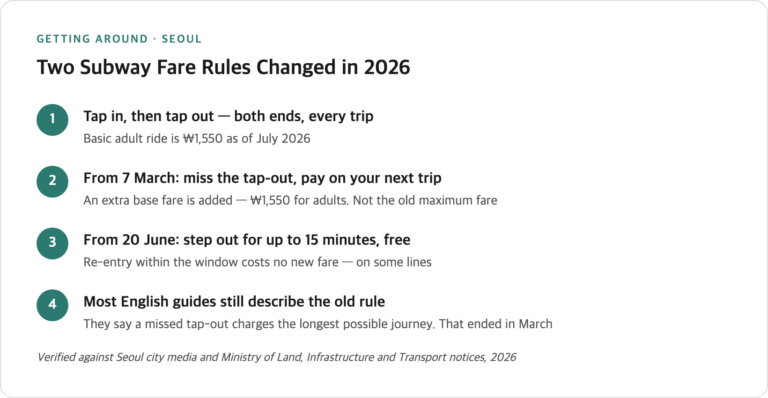
Subway apps are a separate category. For fare rules and transfer windows, see the subway guide — the apps handle routing, not fare policy.
-
Two address systems coexist. Road-name and lot-number formats are both current. Search by business name when you can.
-
Offline use is limited. Both Korean apps expect a connection for routing, so plan your data setup before you land rather than relying on cafe wifi.
Practical Tips
-
Install Naver Map before you fly. It is the single most useful app for a first visit.
-
Add KakaoMap too. Free, and better for live transit detail.
-
Switch to English immediately after install. Doing it once saves repeated confusion later.
-
Paste Korean addresses rather than typing English ones. Copy from your hotel confirmation and paste into search.
-
Do not rely on Google Maps for driving. There is no workaround.
-
Keep Google Maps for saved lists and English reviews. The two systems complement each other.
-
Sort out data before you arrive. Routing needs a connection — see the eSIM and SIM comparison.
Frequently Asked Questions
Why doesn’t Google Maps work properly in Korea?
Korean law restricts the export of detailed mapping data to servers outside the country. Google cannot process the data abroad, so driving navigation is unavailable and walking and transit directions are limited. The restriction applies to foreign mapping services generally.
Which is better, Naver Map or KakaoMap?
Naver Map has the more complete English interface and is the better all-round choice for a first visit. KakaoMap gives stronger real-time transit information, including which subway car to board for the fastest transfer.
Do I need a Korean phone number to use them?
No. Both work for navigation without registration or a Korean number.
Can I use Google Maps for the subway?
It will show you routes but without live arrival data. The Korean apps are meaningfully better for anything time-sensitive.
Are the apps available in English?
Yes. Naver Map’s English mode is the more complete of the two, covering menus, search and voice navigation.
What about renting a car?
You need a Korean navigation app or the vehicle’s built-in system. Google Maps cannot provide driving directions in Korea at all. This matters most on Jeju, where car rental is common.
Why do addresses sometimes not work?
Korea uses two address systems side by side — road-name and lot-number. If one format fails, try the other, or search by business name instead.
Do I need mobile data for these apps?
Yes for routing and live transit. Sort out a SIM or eSIM before or on arrival.
Related Questions
- Seoul Subway: Tap-Out Rules That Changed in 2026
- T-money Card: Buying, Topping Up, and Getting Your Money Back
- Visiting Jeju Without a Car — Buses, Fares and Transfer Rules
- Getting Around Korea: The Transport Guide That Connects the Details
- Incheon Airport to Seoul: Every Option, Including the Night Bus