Kakao Taxi in Korea: Card Rejected? Pay Driver or Use k.ride
Last Updated on August 30, 2026
Quick Answer
Download Kakao T, Korea’s default taxi-hailing app, and try registering a card. If the domestic payment system rejects a foreign card, swipe to “pay the driver” during booking and settle up in cash or with a physical card at the end. Kakao Mobility also runs a second, foreigner-only app, k.ride, which books the same driver network with English support and foreign card payment built in.
Which App Should You Use: Kakao T or k.ride?
Most English-language guides send you straight into Kakao T and leave you to fight with the payment screen. That’s still the right starting point — it’s the app almost everyone in Korea uses — but it isn’t the only option, and it’s worth knowing the second before your card gets rejected at the curb.
I looked up both apps directly on the U.S. App Store rather than relying on secondhand descriptions — release notes included, which matters: the two are updated on different clocks. Kakao T is at version 7.13.0, updated August 26, 2026, listing English, Japanese, and Korean. k.ride is at version 1.9.3, updated August 4, 2026, listing English, Japanese, and both Simplified and Traditional Chinese — no Korean at all, a signal of who it was built for.
Kakao T (카카오 T) is Kakao Mobility Corp.’s general-purpose ride app — launched as KakaoTaxi in 2015, rebranded in 2017 — and it’s the one most Korean residents already have. Beyond taxis it also covers bikes and scooters, a designated-driver service, parking, bus/train/flight bookings, and rental cars. Its “Travel” tab offering to “easily request a taxi abroad (available in Japan and Vietnam)” is for Korean users travelling out of Korea, not foreign visitors arriving in it — easy to tap by mistake.
k.ride is a separate app built specifically for international travelers, released May 22, 2024. Its own site bills it as the “Essential Taxi App for Global Travelers” — “k.ride with korea no.1 mobility platform Kakao T” — meaning it dials the same driver network as Kakao T, just through an interface built for a foreign visitor’s problems: destination search in 133 languages, auto-translated in-app chat with the driver, and payment by credit or debit card, mobile payment, Alipay+, or WeChat Pay — and, per the app’s August 2026 release notes, PayPal. Sign-up is by authenticating your device or linking a social account, and published customer support runs 09:00–02:00 KST, daily.
The catch: k.ride lists Korea among 35 countries it operates in and draws on the Kakao T driver network, but public first-hand accounts of actually using it inside Korea are hard to find — nearly everything public about it is the app’s own description of itself. Treat it as an officially supported alternative worth trying, not a proven crowd favorite yet.
| Kakao T | k.ride | |
|---|---|---|
| Built for | Everyone in Korea (mostly Korean users) | Foreign visitors specifically |
| App languages | English, Japanese, Korean | English, Japanese, Simplified & Traditional Chinese (no Korean) |
| Sign-up | Phone verification or Kakao account | Device authentication or a linked social account |
| Payment | Card registration, or “pay the driver” | Card, mobile payment, Alipay+, WeChat Pay; PayPal added in the August 2026 update |
| Destination search | Romanized names work in practice; not officially documented | Documented for 133 languages |
| Driver chat translation | Not confirmed | Documented, 133 languages |
| Customer support | No published English-language channel found | 09:00–02:00 KST, daily (published) |
| Vehicle types | Blue, Venti, Deluxe, Black, plus bikes/scooters | Standard, Comfort, Minivan, Deluxe, Luxury |
| Driver network | The larger, default network | Same network, foreigner-facing interface |
None of this means skip Kakao T — it’s still the bigger network and the default choice. The point is to know k.ride exists before you’re standing outside the airport with a card that won’t register. The rest of this guide follows Kakao T, noting where k.ride handles a step differently.
Installing the App
Both apps are available from a U.S. (or other overseas) App Store or Google Play account — no Korean store account needed.
- Kakao T (iOS): search “Kakao T” on the App Store. Free.
- Kakao T (Android): search “Kakao T – Taxi, Driver, Bike” on Google Play.
- k.ride: listed as “k.ride – taxi, cab, travel” on the App Store, or
com.kakaomobility.krideon Google Play. Also free.
If you’re arriving via Incheon Airport, install whichever app before you land — airport Wi-Fi and a fresh eSIM or data plan beat doing it curbside on a weak signal.
Local tip — k.ride’s August 2026 release notes added something no English guide covers: pre-booked airport pickups at Incheon Terminal 1 and 2, Gimpo, and Jeju — a ride arranged before you land rather than a queue you join after customs. The notes name the four airports and nothing else. Booking lead time, price, and cancellation terms aren’t published there, so check them in the app before relying on it.
Signing Up and Verifying Your Account
This is the step with the least official documentation — no first-party Kakao Mobility walkthrough of Kakao T’s own sign-up flow turned up anywhere, so the following is a synthesis of traveler and community reports, not a confirmed single source.
Signing up with an overseas phone number is reported to work in most cases: enter your country code and number, and a verification text arrives. Several travelers report the wait being longer than a domestic number would take, occasionally a day or more, so do this before you actually need a ride. Email or linked social-account sign-up also appears to be an option, separate from phone verification.
One recurring trap: if you sign up with a home-country number, then swap in a Korean SIM partway through your trip, your number changes — and some users report being logged out with no easy way back in unless they’d also linked an email or account login. If you’re switching to a local SIM at any point, set up that alternate login before you swap numbers, not after.
k.ride sidesteps this differently: its sign-up is device authentication or a linked social account, which doesn’t depend on holding one specific number for the whole trip.
Setting the App to English
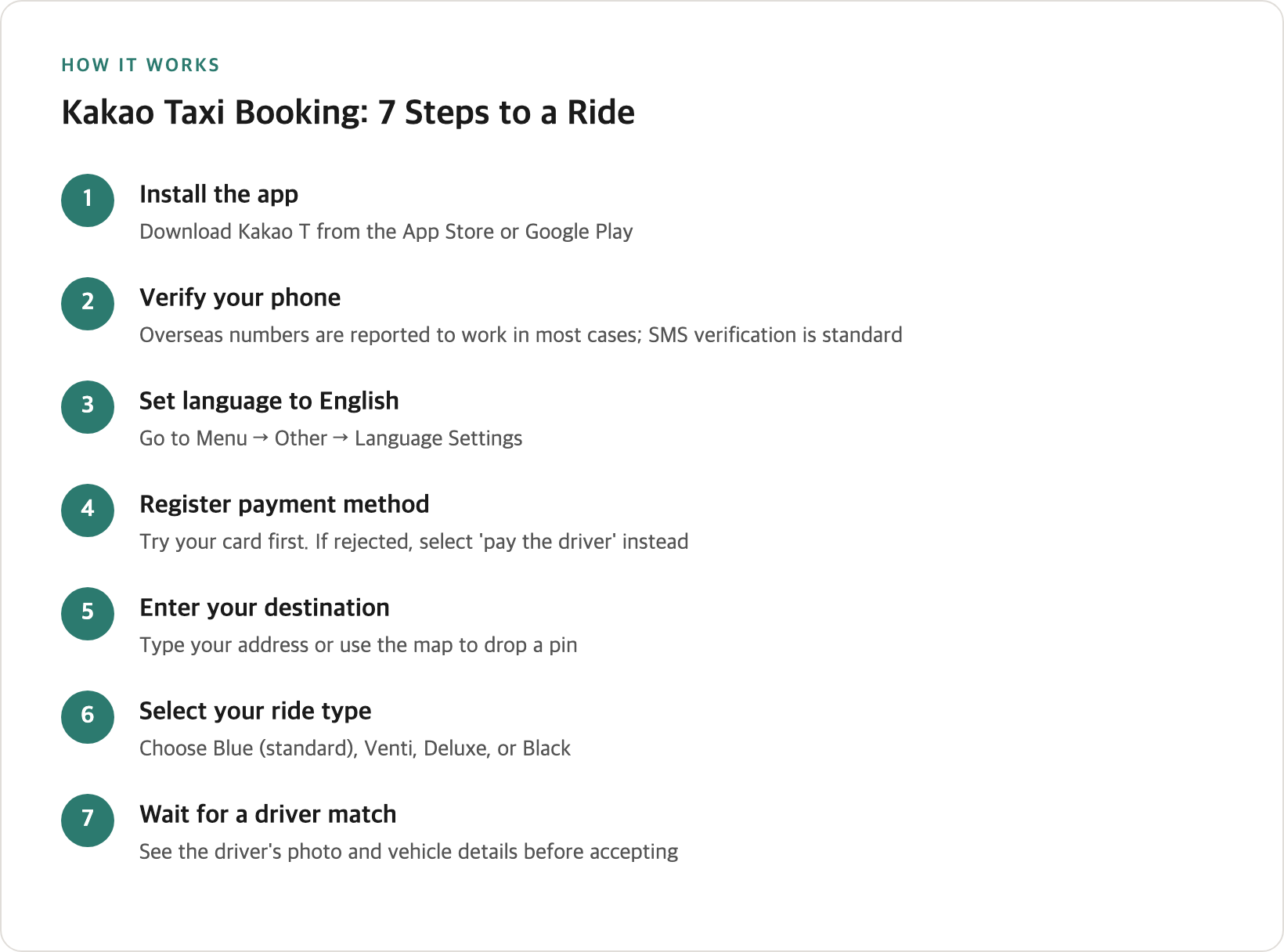
Kakao Mobility’s own Brunch (corporate blog) post from 2018 describes the path as Menu → Other → Language Settings, after which the app restarts in your chosen language. That description is eight years old, and no newer first-party source confirms the wording still matches — treat it as “somewhere in the settings area” and expect small differences by version.
What’s more consistently reported: once switched, most buttons and menus appear in English, though some place names and driver messages can still show up in Korean. The app also lists a voice-recognition option for setting pickup and destination points, useful if typing Korean isn’t practical.
k.ride doesn’t need this step — its interface only ships in English, Japanese, and Chinese from the start.
Registering a Payment Method — Where Most Trips Stall
This is the step most English guides focus on entirely, and where the “foreign cards just don’t work” story is more absolute than the evidence supports. Kakao T’s own App Store description mentions payment in one line — “Kakao T Point — Pay for all service charges with a single card registration” — with no card-nationality condition stated anywhere.
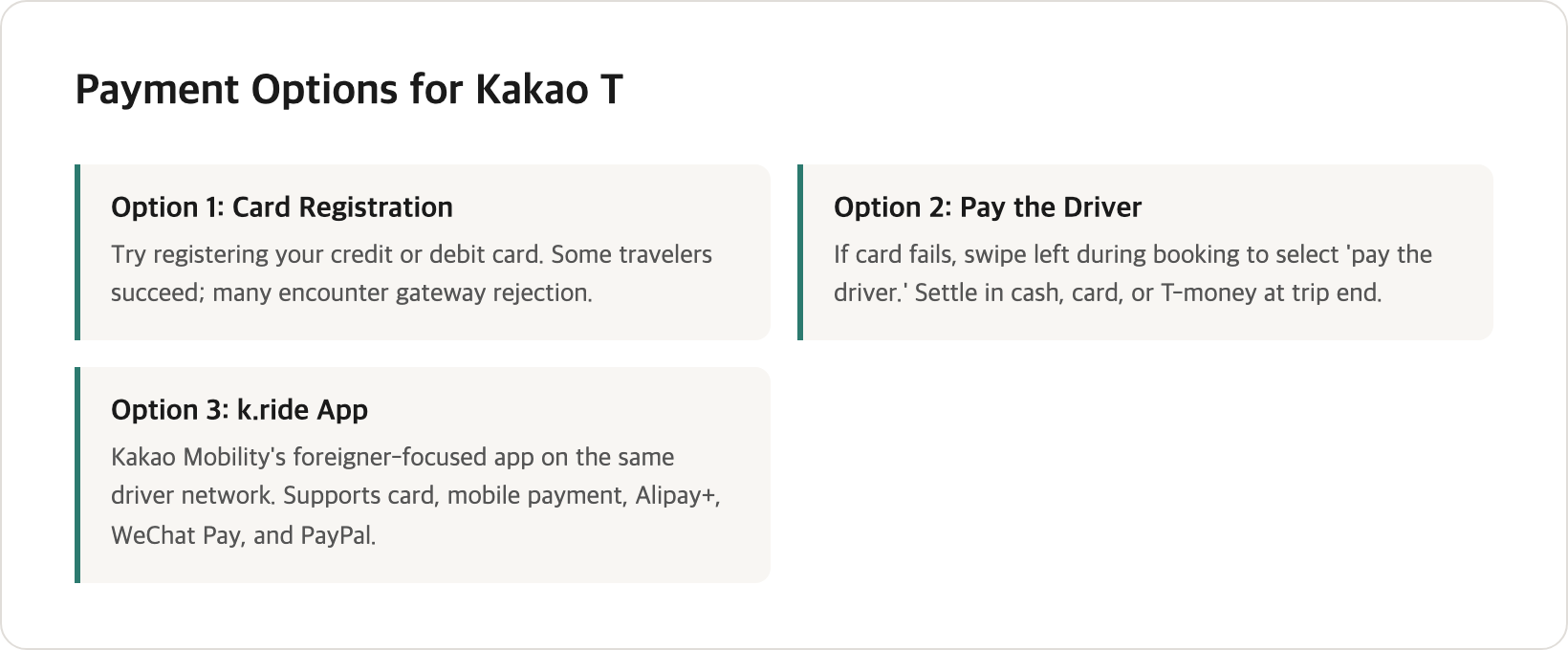
In practice, the friction is real but inconsistent. Korea’s domestic payment gateways, tied to the country’s identity-verification system, routinely reject overseas-issued cards during registration. But it isn’t universal: on Reddit’s r/koreatravel, one traveler reported paying for “all Kakao taxi’s with our foreign VISA credit card, no issues,” while others describe the registration screen refusing their card outright. Debit cards from Wise or Revolut come up repeatedly as more likely to clear the gateway than a typical home-bank credit card, though no hard data backs that pattern either.
Local tip — Most guides describe foreign-card registration as simply broken. It isn’t binary. Some travelers register a foreign Visa or Mastercard with no trouble; most don’t. Card issuer, card type, and timing all seem to matter, and there’s no published list of which combinations clear Korea’s domestic gateway.
If registration fails, the standard workaround is to pay the driver directly — swipe left on the payment-method screen during booking to reveal a “pay to the driver” option, then settle up in cash, a physical card, or T-money at the end. Several English guides already mention this. What they consistently skip is that the workaround reportedly doesn’t extend to Kakao Venti, the large-van option — without a card registered, the booking screen for that vehicle type may not let you call one at all. That traces to a single Korean community thread rather than an official source, so treat it as a caution rather than a confirmed rule, and register a card in advance if a van is part of the plan.
Cash still helps as a backup — a stop at a Korean ATM before relying on pay-the-driver rides, and carrying a mix of cash and card generally makes Korea easier regardless of which taxi app you use.
k.ride is built to avoid this problem entirely, with credit or debit card, mobile payment, Alipay+, and WeChat Pay all listed as payment options, and PayPal added in the app’s August 2026 update. Seoul’s own city government named this exact friction point when it launched a competing app, TABA, on December 1, 2023.
Local tip — I read the Korea.net article itself rather than the roundups that quote it. The government’s own news service described the problem when Seoul launched that rival app: Korea.net wrote that “domestic taxi-hailing services pose challenges for non-Koreans due to limitations such as authentication procedures available exclusively through domestic mobile telecom companies and payment methods centered on domestically issued cards.” Read the wording closely — “centered on,” not “restricted to.” That’s a government description of the market rather than a claim about Kakao T by name, but it confirms this isn’t just traveler frustration.
Entering Your Destination
Kakao T’s App Store description doesn’t formally document multilingual destination search, but in practice the search bar recognizes romanized place names and addresses well enough for most tourist destinations — hotels, stations, named landmarks. It isn’t a guarantee for less common addresses, so a Korean-script backup (a hotel business card, a map-app screenshot, or a saved note) is worth having.
If multilingual search matters specifically, k.ride documents it directly: its listing states destination search works across 133 languages — a stronger guarantee than anything in Kakao T’s own materials.
Either way, Naver Map or KakaoMap — not Google Maps — are the standard navigation apps in Korea. Pulling up a location there and copying the address into your taxi app avoids a destination search coming up empty.
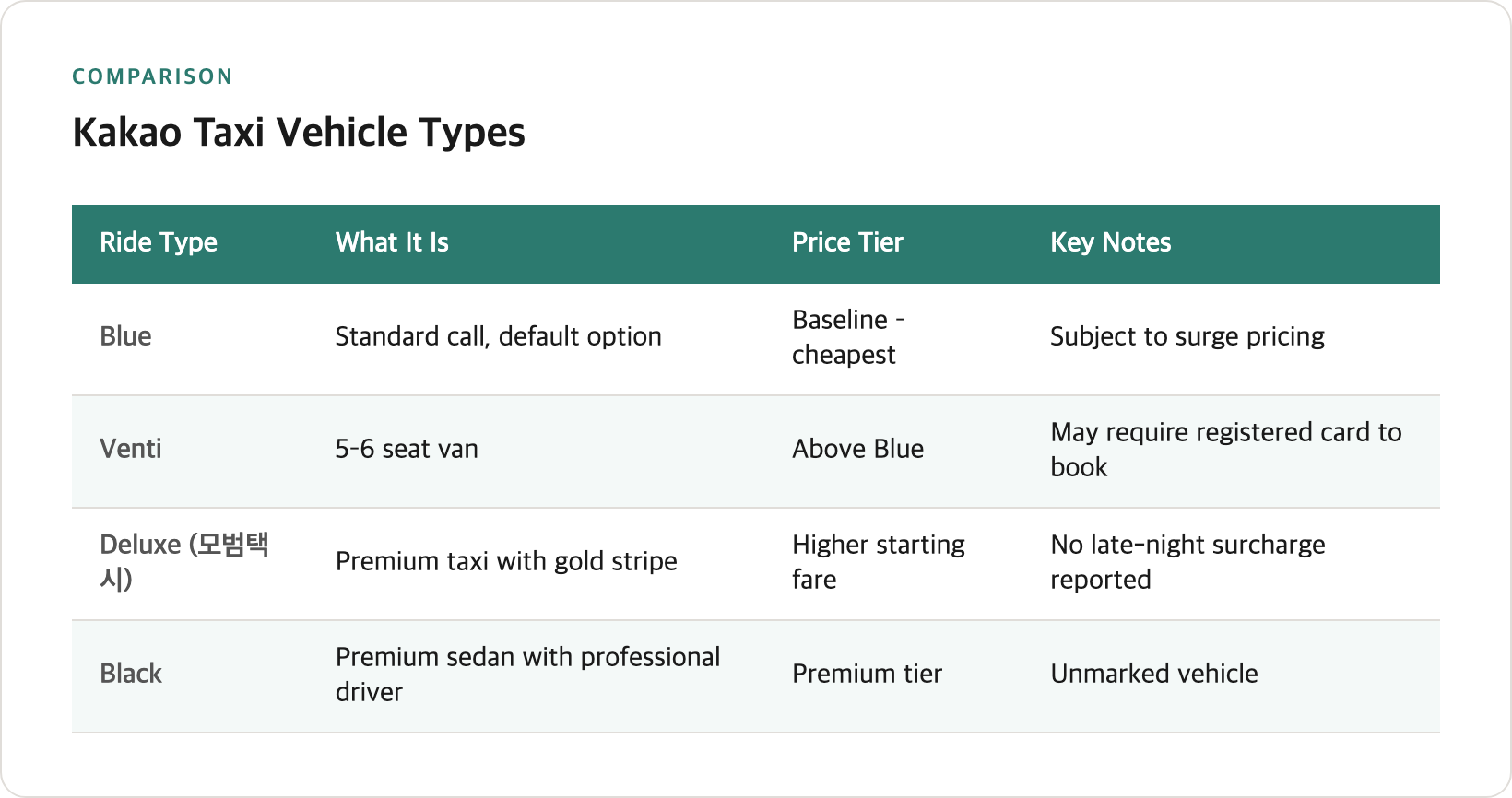
Choosing a Ride Type: Blue, Venti, Deluxe, and Black
Kakao T’s fare page (policy.kakaomobility.com) renders its rate tables through JavaScript, and I wasn’t able to pull current numbers from it. The Korean roundups that do quote won figures mostly carry no publication date, and several appear to predate 2023 — too old to repeat here. What doesn’t go stale is the shape of the tiers, and the app quotes an estimated fare before you confirm. Use that number, not one from a guide.
| Ride type | What it is | Where it sits on price | Notes |
|---|---|---|---|
| Blue | Standard call, the default option | The baseline, and the cheapest of the four | Subject to surge pricing |
| Venti | 5–6 seat van | Above Blue | USB charging, Wi-Fi reported; may require a registered card to book at all |
| Deluxe (모범택시) | Government-licensed premium taxi, black with a gold stripe | Higher starting fare than Blue | Reportedly no late-night surcharge — the trade-off for that higher start |
| Black | Premium sedan with a professional driver | Premium tier, above Blue | Unmarked vehicle |
k.ride’s own site lists a simpler tier structure — Standard, Comfort, Minivan, Deluxe, and Luxury — and states you can check an estimated fare before calling, a useful sanity-check regardless of which app you book through.
Calling a Ride and Waiting for a Match
Once destination and vehicle type are set, the app shows a fare estimate and wait time, then the driver’s photo, vehicle, and plate once matched — so you can confirm you’re getting into the right car.
Cancellation fees apply after a match, under two different rules. An instant call carries a small flat fee if you cancel shortly after a driver is assigned, or if the driver arrives and waits without reaching you. A reserved ride on Venti or Black works differently: cancel close to the scheduled pickup and the charge is calculated against the fare itself. Korean consumer-news coverage quotes figures for both, but that reporting appears to date from around 2022 with no confirmed update — so the app’s own cancellation screen is the only number worth acting on.
Local tip — Cancellation isn’t one policy, it’s two. An instant call is a small flat fee; a reserved Venti or Black cancelled close to pickup is charged as a share of the fare — a different order of magnitude. None of the English guides checked for this article mention the reserved-ride rule at all. Read the fee the app quotes before cancelling a booking you made in advance.
There’s no reliable published data on average matching times, so this guide won’t guess at one — it depends heavily on time of day, weather, and location, same as any ride-hailing app anywhere.
Talking to Your Driver
Kakao T masks your phone number with a temporary virtual number, according to the app’s Wikipedia entry — the driver is shown your pickup location, not your personal details.
Whether Kakao T’s own chat offers driver-side translation the way k.ride’s does isn’t stated anywhere in its own materials. k.ride’s listing explicitly states chat is auto-translated across 133 languages; nothing in Kakao T’s materials makes the same claim, and a 2024 Korean business-news piece even notes some drivers finding translation prompts confusing when they appear.
If a driver calls directly, expect Korean unless you’ve chosen an app or vehicle type with English support built in. Having your destination’s Korean name ready to read aloud covers most of what a driver actually needs.
During the Ride
Wear your seatbelt in the back seat, not just the front. Korean sources disagree on exactly when rear-seat belts are legally required in a taxi, so treat every seat as the safe default rather than a rule this guide can cite precisely.
No reliable source describes a front-versus-back-seat etiquette or a standard luggage-handling custom for Kakao Taxi specifically, so this guide won’t invent one that may not exist — get in wherever there’s space, and expect the trunk for larger bags as with any taxi.
Getting Out and Paying
If you registered a card, payment is automatic when the trip ends. If you used “pay the driver,” settle up directly — cash, card, or T-money are commonly accepted, though not every driver takes every method.
Seoul taxis carry a late-night surcharge, and it isn’t flat — Korean sources describe it stepping up in the deepest overnight hours and easing at the shoulders. The percentages and time windows they quote carry no confirmed publication date, so treat the surcharge as a fact and the numbers as unverified, and go by the app’s estimate. Deluxe (모범택시) is repeatedly described as exempt altogether, the trade-off for its higher starting fare. Whether tolls are billed separately isn’t documented in any source checked for this guide — look at the fare breakdown before a trip likely to use a toll road.
Receipts are straightforward: the app’s trip-history section (“이용기록”) lets you save a photo or print one from a computer. A tax-deductible receipt for a card payment typically comes from your card issuer’s statement rather than the app.
If Something Goes Wrong
For a lost item: open the app, go to trip history, select the ride, and use “report lost item” or contact the driver directly — generally only possible within about seven days. After that, or if direct contact fails, Kakao T’s customer service line is 1599-9400, described as staffed 24 hours for urgent matters, with general phone support limited to weekday business hours. Reported hours for KakaoTalk chat support vary between sources, so no exact window is stated here. If that route runs out — the seven days pass, or the driver doesn’t respond — the item stops being an app problem and becomes a database one: lost and found in Korea sets out the Seoul taxi database and the police portal that holds items once nobody has claimed them.
I searched Kakao Mobility’s own customer-support page directly for an English-language contact channel and didn’t find one — that only tells you it wasn’t visible there, not that no such option exists somewhere in the app. Still, it’s a meaningful gap: k.ride’s listing states plainly that support is available “year-round from 9 AM to 2 AM (KST),” in English, inside the app.
Local tip — If a lost item or billing problem comes up after the ride, k.ride publishes its English-language support hours (09:00–02:00 KST, daily) directly in its App Store listing. No equivalent published English-support channel turned up for Kakao T — which doesn’t prove one isn’t buried somewhere in the app, but it’s a real difference in what’s documented.
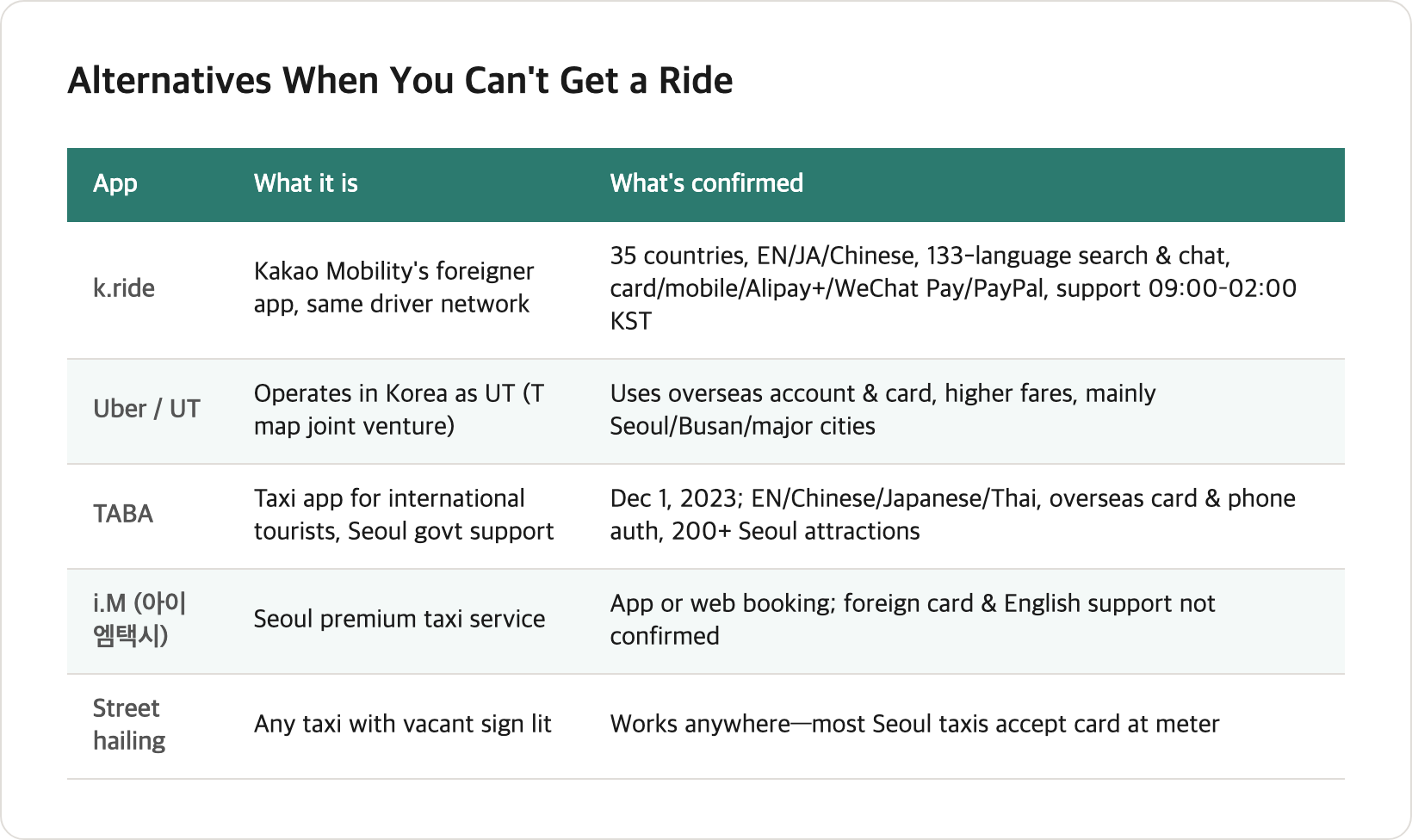
When You Can’t Get a Ride — Alternatives
If Kakao T isn’t matching a ride, or the payment friction is more than you want to deal with, a handful of other options exist:
| App/option | What it is | What’s confirmed |
|---|---|---|
| k.ride | Kakao Mobility’s official foreigner-only app, same driver network | 35 countries including Korea, EN/JA/Chinese, 133-language search and chat, card/mobile payment/Alipay+/WeChat Pay/PayPal (added August 2026), published English support hours, pre-booked airport pickups |
| Uber (branded “UT” in Korea) | Joint venture between Uber and T map Mobility since 2021; the app switches to “UT” automatically inside Korea | Reportedly uses your existing overseas account and card; fares reported somewhat higher than Kakao T; mainly Seoul, Busan, and other major cities |
| TABA | Taxi app for foreign tourists, developed with Seoul city government support | Launched December 1, 2023; English, Simplified/Traditional Chinese, Japanese, and Thai; home-country phone authentication and overseas cards, per Korea.net; one-tap destinations for 200+ Seoul attractions, plus a 5% first-ride discount announced at launch (whether it still runs isn’t published) |
| i.M (아이엠택시) | Seoul-based premium taxi service | App or web booking; foreign-card and English-language support not confirmed through its own FAQ page |
| Hailing on the street | Any taxi with an illuminated vacant sign | Works the same as anywhere — most Seoul taxis accept card at the meter |
If avoiding card and number friction is the priority, k.ride or TABA were built for that. If you already trust an overseas Uber account, UT uses it directly. And if a subway or KTX station is nearby, getting around Korea generally works best as a mix of transit and taxis rather than relying on either alone.
Practical Tips
-
Install both Kakao T and k.ride before you land. Kakao T is the bigger, default network; k.ride is the fallback built for foreign cards and English support.
-
If your card is rejected, swipe to “pay the driver” rather than giving up. It’s a standard, documented option — you can still book a ride and pay in cash, card, or T-money at the end.
-
Set up an email or linked social login before you switch to a Korean SIM. A phone-number change mid-trip can lock a phone-verified-only account out.
-
Don’t count on booking a Venti (large van) without a registered card. Travelling as a group who might need a van — register a card in advance, or plan on Blue-class taxis instead.
-
Have your destination’s Korean name or address ready as a backup. Romanized search works for common landmarks, but a written backup covers the cases it doesn’t.
-
Check the fee before cancelling a reserved Venti or Black booking. The gap between an instant-call fee and a reserved-ride fee is large enough to matter.
-
Keep a payment fallback beyond your registered card. A stop at a Korean ATM for cash covers you if “pay the driver” ends up being your only working option.
Frequently Asked Questions
Can foreigners use Kakao T without a Korean phone number?
Sign-up with an overseas number is reported to work in most cases, based on traveler and community reports rather than an official Kakao Mobility guide — the SMS verification can sometimes take longer than a domestic number would. If you swap to a Korean SIM mid-trip, set up an email or linked account login first, since a number change can otherwise lock you out.
Does Kakao T accept foreign credit cards?
Sometimes. Registration succeeds for some travelers and fails for others, with no published list of which issuers work reliably. If it fails, book using “pay the driver” instead and settle up in cash, card, or T-money — except reportedly Kakao Venti, which may require a registered card to book at all.
What is k.ride and how is it different from Kakao T?
k.ride is Kakao Mobility’s separate app built for foreign visitors, launched in 2024. It runs on the same driver network as Kakao T but adds English/Japanese/Chinese support, 133-language destination search and chat translation, card, Alipay+ and WeChat Pay payment plus PayPal as of its August 2026 update, and published English-language customer support hours.
How do I switch the Kakao T app to English?
The setting is somewhere in the menu/settings area — a 2018 company blog post describes the path as Menu → Other → Language Settings, though the exact wording may have shifted since. Once switched, most of the interface displays in English, though some place names and driver messages can still appear in Korean.
What’s the difference between Kakao Blue, Venti, Deluxe, and Black?
Blue is the standard, most common option. Venti is a 5–6 seat van, reportedly requiring a registered card to book. Deluxe (모범택시) is a government-licensed premium taxi with a higher flat fare but reportedly no late-night surcharge. Black is an unmarked premium sedan with a professional driver. Check the app’s own fare estimate before booking.
Is there a cancellation fee if I book a Kakao Venti or Black and change my mind?
Yes, and the two work differently. A reserved ride on Venti or Black cancelled close to the scheduled pickup is reported to be charged against the fare itself, which can be a large amount. An instant-call cancellation carries a much smaller flat fee. Older Korean news coverage quotes specific figures for both, but with no confirmed update since around 2022 — confirm the fee the app shows before cancelling.
What do I do if I leave something in a Kakao Taxi?
Open the app’s trip history, select the ride, and use the lost-item report or driver-contact option — this generally works within about seven days. After that, or if direct contact fails, Kakao T’s customer service line is 1599-9400, described as staffed 24 hours for urgent issues.
Is Uber available in Korea, and is it better than Kakao T for tourists?
Uber operates in Korea through a joint venture with T map Mobility, switching to “UT” automatically and reportedly working with your existing overseas account and card. Fares are reported somewhat higher than Kakao T’s. It’s reasonable if you already trust your Uber account and want to skip Korea-specific registration, mainly in Seoul, Busan, and other major cities.
Related Questions
- Getting Around Korea: The Transport Guide That Connects the Details
- Cash or Card in Korea? The Apps That Won’t Take Your Foreign Card
- Why Google Maps Doesn’t Work in Korea — and What to Use Instead
Featured image: Photo by Ryoji Iwata on unsplash