Korean Photo Booth QR Codes: How Long Each Brand Keeps Your Photos
Last Updated on September 16, 2026
Quick Answer
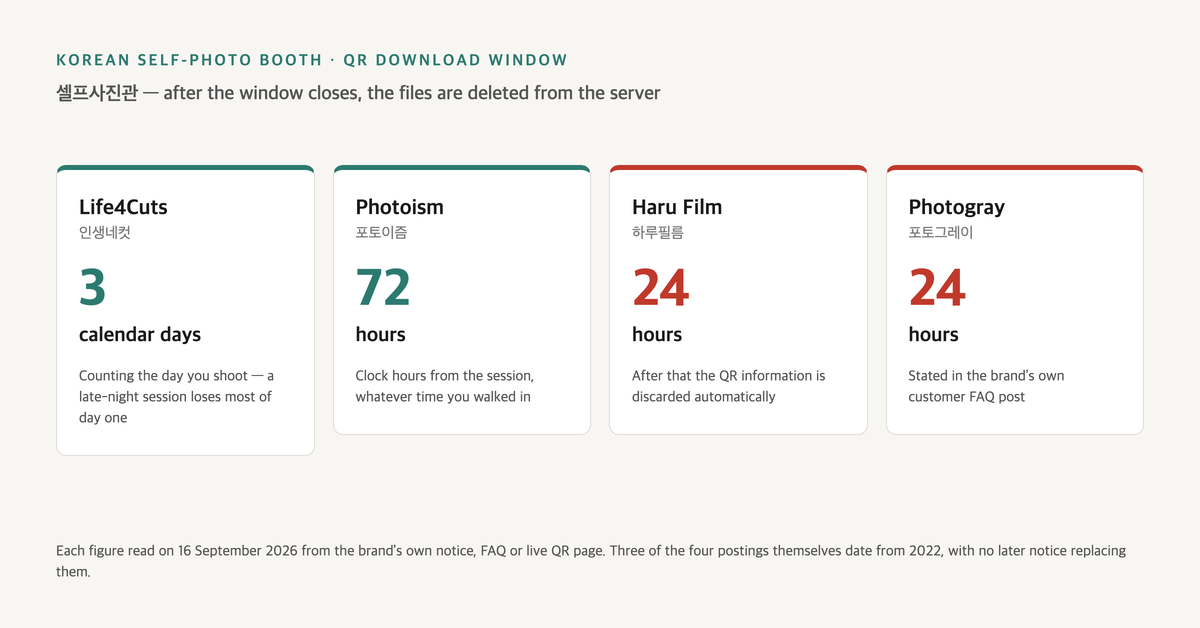
Every Korean self-photo booth prints a QR code beside your photo strip, and that QR is the only route to the digital files. The window is not the same at every brand: Life4Cuts gives you three calendar days including the day you shoot, Photoism 72 hours, Haru Film 24, Photogray 24. Once it closes, the brand deletes the files and cannot get them back.
The Full Answer
The Korean self-photo studio (셀프사진관) is a room of unstaffed booths where you pay approximately ₩4,000–5,000 (as of 2026), pose for a set of frames, and walk out with printed strips and a QR code. The prints are the souvenir. The QR is the part that expires.
That expiry is the single fact English-language coverage handles worst. I opened the four largest brands’ own QR and FAQ pages on 16 September 2026, and the windows are not the same — one brand counts calendar days, one counts hours, and two use a figure less than half the longest. Then I read what the same question returns in English. Google’s AI summary answers one query with “QR codes usually expire within 24 to 48 hours,” and another with “24 to 72 hours depending on the specific location and regional server policy,” adding that “most locations enforce a strict 24-hour limit.” I could not find that per-location, per-server mechanism anywhere in Life4Cuts’ own notices. Their published rule is a single company-wide number. The variation is real, but it is between brands, not between branches — and reading it as a branch quirk is what makes people relax about a deadline they should be watching.
The English guide ranking first for “korean photo booth guide” gives no expiry figure at all. Creatrip’s rundown of nine booth brands gives one number, 24 hours, for all of them. Neither is a bad article. They answer a different question than the one you have at 23:00 on a Friday with a strip in your hand.
This is a reference rather than a walkthrough. The booths are not hard to operate — what is not obvious is which choices are irreversible, and every one of them happens either before the shutter or within a few hours after it.
The Expiry Table: Four Brands, Four Answers
Each figure below comes from the brand’s own channel, and the right-hand column matters as much as the number.
| Brand | Window | How the clock is counted | Where it’s published |
|---|---|---|---|
| Life4Cuts (인생네컷) | 3 days including the day you shoot | Calendar days, not hours | Company notice + official QR instructions page |
| Photoism (포토이즘) | 72 hours | Hours from the session | Live QR download page, in Korean and English |
| Haru Film (하루필름) | 24 hours | From the session | Official customer FAQ |
| Photogray (포토그레이) | 24 hours | From the session | Official Instagram FAQ post |
Local tip — The expiry window depends on which door you walked through, and three of the four brands publish a figure no English guide carries. Life4Cuts’ own QR instructions state three days counting the shooting day; Photoism’s QR page states 72 hours, in English, on the same screen Korean users see; Haru Film’s FAQ and Photogray’s customer FAQ post both state 24 hours. The most widely read English roundup applies 24 hours to all nine brands it covers. The spread between the shortest and longest published window is three to one.
A note on dates, because it cuts against the table above. All four figures were read on 16 September 2026 from pages the brands were serving that day — Photoism’s 72-hour line sits on the working download screen you land on after scanning. Three of the four postings are old, though: the Life4Cuts notice image, the Haru Film FAQ entry and the Photogray post all date from 2022, and I could not find a later notice superseding any of them. Still published is not the same as re-confirmed this month. Read the table as “what each company has published, as of September 2026,” and download on the day.
Calendar Days Are Not 72 Hours
Life4Cuts and Photoism look close on paper — three days against 72 hours. They are not the same rule, and the gap opens at exactly the hour most people use these booths.
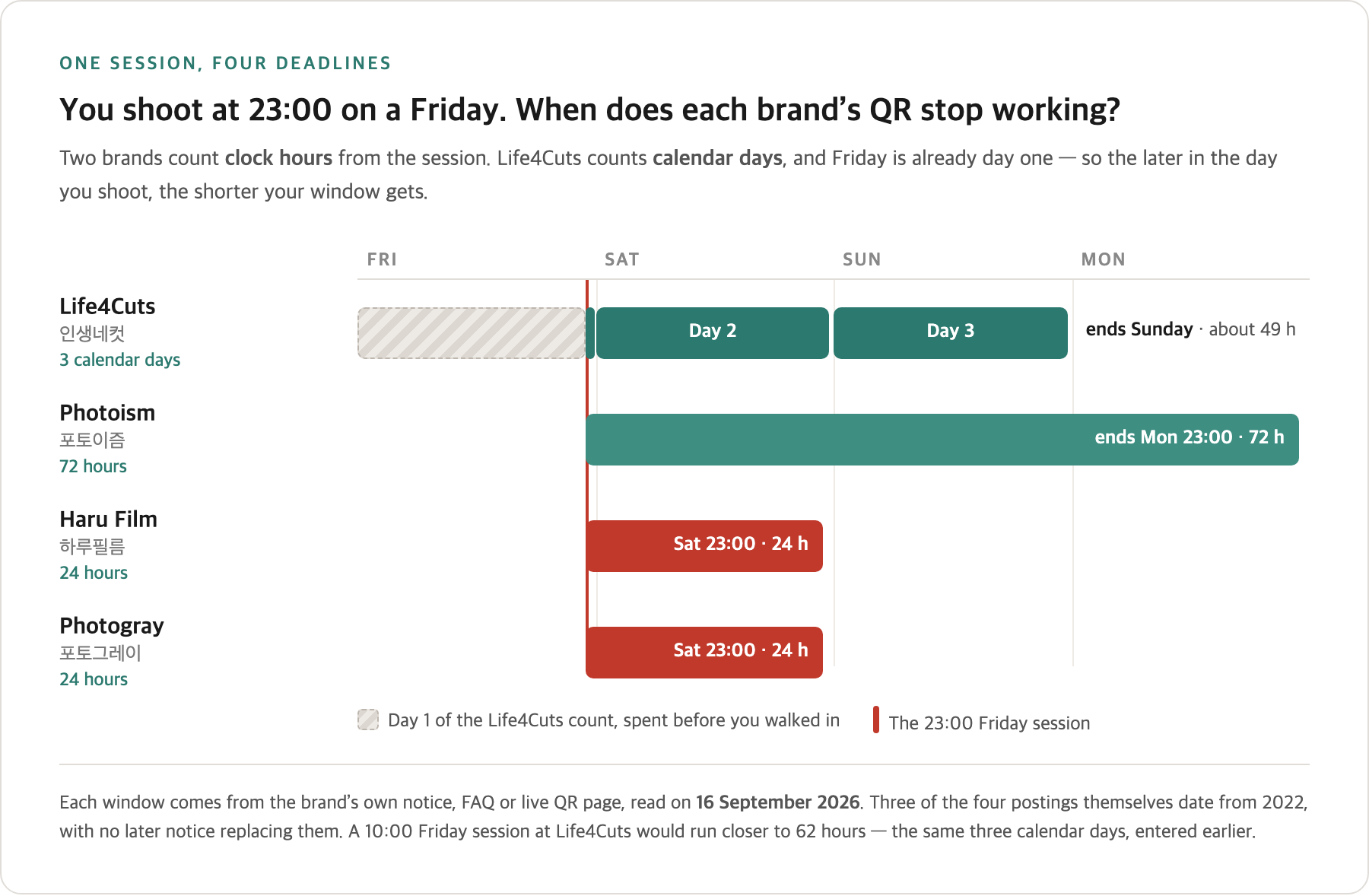
Life4Cuts counts the day you shoot as day one. Shoot at 23:00 on a Friday and Friday is already spent; you have Saturday and Sunday, roughly 49 hours. Shoot at 10:00 that same Friday and you have closer to 62. The window moves depending on the hour you walked in, which is unusual enough that it is worth restating: the later in the day you shoot at Life4Cuts, the shorter your window.
Photoism’s 72 hours behaves the way you expect. The clock starts at the session and runs three full days regardless of the hour. Same Friday 23:00 session, files available until Monday evening.
Haru Film and Photogray remove the ambiguity by being short. Twenty-four hours from the session means an evening shoot expires the following evening — and Haru Film states plainly that once the period passes, the QR information is discarded automatically and head office cannot check it either.
The Checkbox That Decides Whether Files Exist At All
Every English guide that covers the sequence lists “select the QR option” as one step among six or seven. Life4Cuts writes it as a warning, and the difference between those two framings is the difference between a clean trip and a lost set of photos.
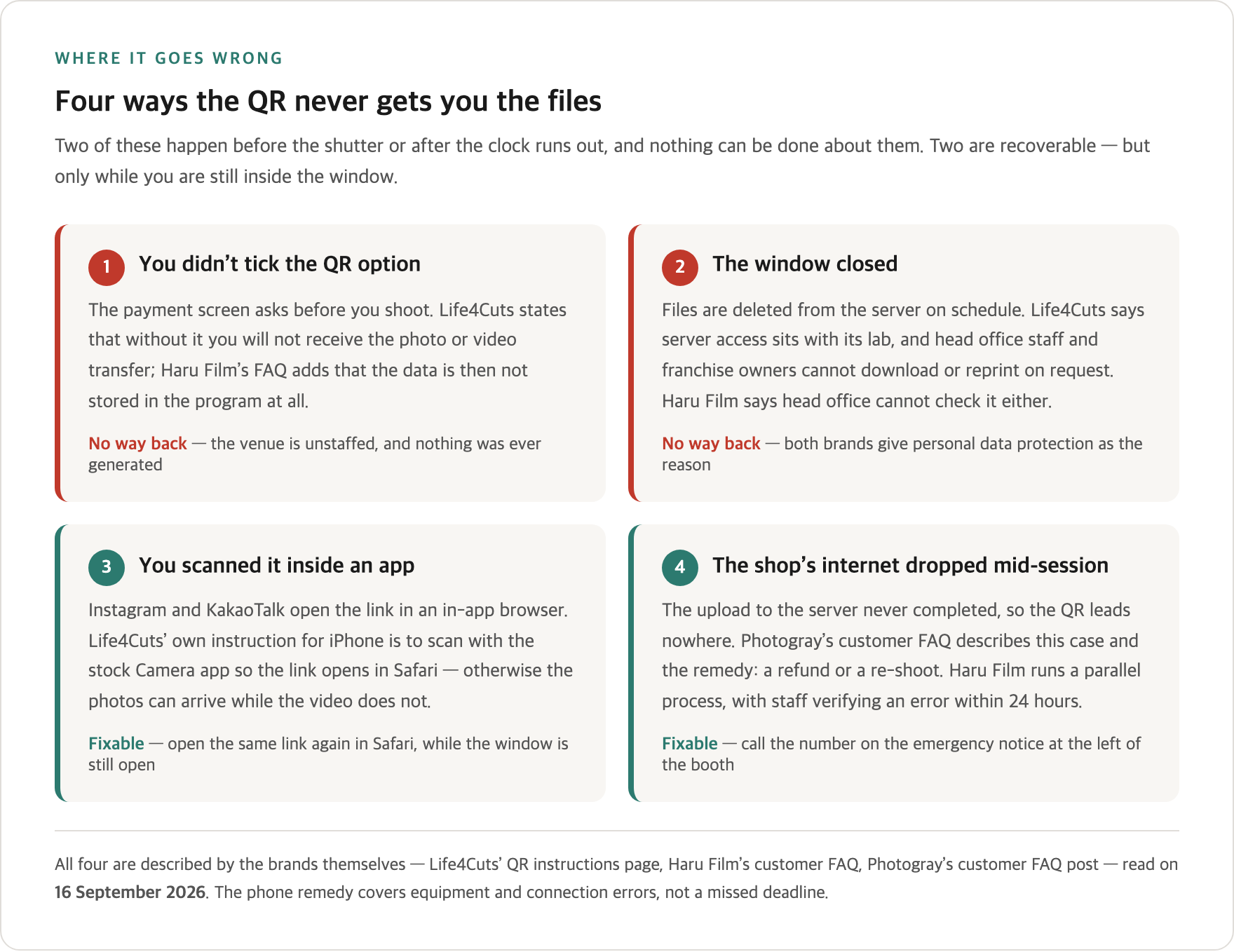
On the payment screen, before you shoot, a prompt asks whether you want the mobile QR transfer. If you do not tick it, Life4Cuts’ own instruction is blunt: you will not receive the photo or video transfer. Haru Film’s FAQ goes further on the consequence: where the non-consent option was selected, the photo data is not stored within the program at all, so head office cannot look it up.
Local tip — If you skip the QR checkbox on the payment screen, the digital files are never generated — and there is no one on site to fix it. Life4Cuts’ own instructions carry this as a caution rather than a step: without ticking it, you will not receive the photo or video transfer. Haru Film’s FAQ adds that in that case the data is not saved in the program at all. These are unstaffed venues. The decision is made before the shutter, and after the session there is no counter to go back to.
Scanning It: the iPhone Rule Nobody Writes Down
Most booths give you photos and a short timelapse or video clip from the session. The video is the part that goes missing, and the reason is which app you scan with.
Life4Cuts’ instructions specify that on iPhone you need to scan with the stock Camera app, so the link opens in Safari, in order to download the video. Scan the same QR from inside Instagram or KakaoTalk and you are in an in-app browser — the photos may come through, the video file will not. The same page walks through where the file lands afterwards: open the download, tap the arrow at the top right, then share and save to your camera roll.
Google’s AI summary compresses all of this into “open the link on your phone’s browser immediately.” Technically true. Practically, an in-app browser is a browser, and that is where the file quietly fails to arrive.
Local tip — On iPhone, scan the QR with the stock Camera app so it opens in Safari — otherwise the video does not download. This is Life4Cuts’ own instruction, not a workaround. QR codes scanned from inside Instagram or KakaoTalk open in an in-app browser, and the photos can come through while the timelapse clip does not. No English guide in the top results distinguishes between the two.
When the QR Does Not Work
There is a failure mode the brands document and the English coverage does not: the upload never happened because the shop’s internet dropped mid-session. You have prints, you have a QR, and the QR leads nowhere.
Photogray’s customer FAQ addresses this directly. If the store’s connection was interrupted and the transfer to the server failed, you call the number printed on the emergency notice at the left side of the booth, and the outcome is a refund or a re-shoot. Haru Film’s FAQ describes a parallel path: staff verifying an error within 24 hours of the session, with the relevant department making contact.
Two limits are worth stating plainly. First, this is an error remedy — a machine or connection failure, not “I forgot to scan in time” and not “I skipped the checkbox.” Second, at Haru Film the error remedy runs on the same 24-hour clock as the files themselves. A problem you notice on day three is a problem outside the window.
Local tip — If the QR opens but the files are not there, there is a phone number on the left side of the booth, and it leads to a refund or a re-shoot. Photogray’s own customer notice describes the cause — the shop’s internet dropping mid-session, so the upload to the server never completed — and the remedy. English guides end at “scan it fast.” None mentions that a recovery path exists, or where the number is. It applies to equipment and connection errors, not to a missed deadline.
One practical wrinkle on calling: Photogray’s customer centre line, 1588-7850, is listed as operating 14:00–23:00. A problem discovered at nine in the morning waits until the afternoon.
The App Changes the Rules — But Only Before You Shoot
Life4Cuts runs its own app, and its current App Store description lists three things that matter here — all of which stop being available the moment you are standing at the kiosk.
A Story feed saves photos and videos from your sessions automatically, described as available to open again whenever you want, with no need to download each time. Shooting through the app produces a finished strip without the QR code occupying a corner of the photo. And a cart lets you pick frames in the app beforehand, then scan one QR at the kiosk to carry payment and setup across.
Local tip — Shooting through the Life4Cuts app saves the session to an in-app Story and leaves the QR code off the printed strip. That is the brand’s own description of its app, and it is the one route we found that sidesteps the three-day window — the files sit in the app rather than on an expiring link. It also removes the QR block from the corner of the print. English coverage of Korean photo booths does not mention the app at all. Two things stay unconfirmed: whether the app’s interface is available in English (the store listing shows Korean plus one other language without naming it), and how long the Story actually retains a session. The listing says “whenever,” which is marketing copy, not a retention policy.
Every protection the app offers is a pre-session decision. Once you are inside a booth with money in the machine, your only options are the QR and the clock.
Photoism Box and Photoism Studio Are Not the Same Thing
English coverage treats Photoism as one thing: an unstaffed booth. The company runs three lines, and two of them behave completely differently.
Photoism Box is the unstaffed booth format — the one the roundups describe. The company’s branch page counted 492 locations as of September 2026. Photoism Colored is a third line.
Photoism Studio is a staffed, reservation-based studio with a booked slot and a package price. Published rates start at ₩20,000 for two people for a 10-minute black-and-white session, with colour adding ₩5,000 and an extra person ₩10,000; a 15-minute four-cut package is ₩30,000 for two (as of 2026, from a price notice uploaded in July 2025). And it has a booking condition that quietly locks out most visitors.
Local tip — Photoism Studio’s reservation deposit can only be paid by bank transfer — no card. The company’s own customer support page states it directly: deposit payment is available by 무통장입금 (direct bank deposit) only, and the deposit is returned on the day of the shoot so you can pay by card at the counter instead. A domestic bank transfer needs a Korean bank account, which means the online booking path is effectively closed to a short-term visitor even though the shoot itself takes cards. This applies to the reservation-based Studio, not to the unstaffed Box booths, which take payment at the machine. No English article in the top results separates the two.
Studio opening hours are listed per branch, and the notice’s phrasing of the daily start time was ambiguous enough that putting a number here would mean inventing one. Check the branch page.
What It Costs, and What to Bring
Booth pricing is the part English coverage gets broadly right. A standard session runs approximately ₩4,000–5,000 (as of 2026), which buys one shoot and two printed strips. The ₩4,000 figure appears on the kiosk screen shown in Life4Cuts’ own QR instructions, though that is an example screen rather than a published price list, and one English write-up reported ₩4,000 and ₩5,000 tiers at a Hongdae branch depending on frame type. Collaboration frames, promotions and individual branches move the number — and if a tie-in frame for a particular group is what you came for, that sits in the same trip as the K-pop company buildings you can and cannot enter.
Finding a specific branch is a Korean map-app job rather than a Google Maps one, for the same reason Google Maps has no driving navigation in Korea. And if you are already dressed for the day, a booth is one way to spend the tail end of a four-hour hanbok rental block — the outfit that earns free entry to Gyeongbokgung under the palace’s written guideline is still on.
Payment is where the honest answer is shorter than you want. Korean and English coverage agree that booths generally accept both cash and cards, and that bill acceptors are often built for ₩1,000 notes specifically. I could not find a primary source from any of the four brands stating whether a foreign-issued Visa or Mastercard works in the booth kiosks. The most any English guide commits to is that a foreign card “may” work. So the advice stops at: carry ₩1,000 notes and treat the card reader as a bonus.
That makes it the same problem as paying at an unmanned coin noraebang booth, where the machine takes small notes and nobody is on site to break a ₩10,000 one. It is also the reason to read which Korean apps reject foreign cards before you assume your card is the fallback, and to pull cash from an ATM that accepts foreign cards rather than hunting for one at 22:00. The same instinct that gets you through Tongin Market’s coin lunchbox applies: small denominations, in advance.
Why the Windows Are So Short
The brands answer this the same way, which tells you the rule is not going to be bent for you. Life4Cuts, Haru Film and Photogray all cite personal data protection as the reason files are deleted from the server on schedule. Photoism’s QR page goes further in the same direction, offering a delete-my-session function on the download screen itself.
Life4Cuts is explicit about the internal consequence: server access sits with their lab, and head office staff and franchise owners cannot download or reprint your files on request. There is no back channel. The company also posted a notice suspending the reprint function in November 2022 — described at the time as temporary, with no later notice restoring it, so its current status is unconfirmed.
One more limitation. The file that goes to the server is resized for mobile delivery, and Life4Cuts states plainly that the downloaded image is a reduced version of the printed photo and cannot be reprinted at original quality. The digital copy is a copy, not a master.
One naming point the company itself corrects: 인생네컷 is a brand name, not the Korean generic term for a self-photo studio. That word is 셀프사진관 — the one to search or say out loud.
What You Need to Know
-
The QR window is set by brand, not by branch. Three calendar days at Life4Cuts, 72 hours at Photoism, 24 hours at Haru Film and Photogray. Google’s AI summary describes branch-level and regional-server variation; the brands’ own notices describe a single company rule each.
-
Three of the four published figures date from 2022. All four were read on 16 September 2026 from pages the brands were serving that day, but the Life4Cuts, Haru Film and Photogray postings themselves are from 2022, without a newer notice superseding them — which is not the same as re-confirmed this month.
-
The payment screen decides whether files exist. Skip the QR consent and nothing is uploaded — not a copy, not a thumbnail. Two brands state this in their own words.
-
The download is not print quality. Life4Cuts states the server copy is resized for mobile and cannot be reprinted at original quality. The paper strip is the master.
-
Payment by foreign card is unverified. No brand primary source confirms or denies it. Cash in ₩1,000 notes is the version that does not depend on being lucky.
-
Photoism Studio is not Photoism Box. The staffed studio takes bookings with a deposit payable only by Korean bank transfer. The unstaffed boxes take payment at the machine.
Practical Tips
-
Download the files the same night, before you sleep. This single habit makes the entire table above irrelevant. The shortest window is 24 hours, and the Life4Cuts window shrinks the later in the day you shoot.
-
Tick the QR option on the payment screen before you shoot. It is the only irreversible choice in the sequence, and it happens before the fun part starts.
-
On iPhone, scan with the stock Camera app. Not from inside Instagram or KakaoTalk. The photos survive an in-app browser; the video generally does not.
-
Carry ₩1,000 notes. Bill acceptors in these machines are commonly built for them, nobody on site can break a ₩10,000 note, and whether your foreign card works is not something any brand has published.
-
Check the QR before you leave the shop. Scan it, open the link, confirm the files load. If the shop’s connection dropped mid-session, the number on the emergency notice at the left of the booth is your remedy — easier to use while you are still standing there.
-
Shoot through the Life4Cuts app if you want the files to outlast the window. It saves sessions to an in-app Story and prints the strip without the QR block. Decide this before you walk into a booth, not after.
-
For the staffed Photoism Studio, sort the deposit before you count on a slot. The reservation deposit is bank transfer only, which needs a Korean account. The shoot itself takes cards at the counter.
Frequently Asked Questions
How long does a Korean photo booth QR code last?
It depends on the brand, which is the part most English coverage misses. Life4Cuts gives you three days counting the day you shoot, Photoism 72 hours from the session, and Haru Film and Photogray 24 hours each. Those are the figures each company publishes on its own site or official account, read in September 2026 — three of the four from posts dated 2022 with no newer notice replacing them, and Photoism’s from a live download page. Google’s AI summary answers the same question with “24 to 48 hours,” and separately with “24 to 72 hours depending on the specific location and regional server policy.” The variation is between brands, not locations.
What happens if my Life4Cuts QR code expires — can they recover the photos?
No. The files are deleted from the server when the window closes, and Life4Cuts states that server access sits with its lab, with head office staff and franchise owners unable to download or reprint on request. Haru Film puts it the same way: once the period passes, the QR information is discarded and head office cannot check it either. Both give personal data protection as the reason. There is no ticket to raise and no fee to pay.
Do I have to do anything before I shoot to get the digital files?
Yes, and it is easy to miss. The payment screen asks whether you want the mobile QR transfer, and it has to be selected before the session. Life4Cuts writes this as a warning rather than a step: without ticking it, you will not receive the photo or video transfer. Haru Film’s FAQ adds that where the non-consent option was chosen, the photo data is not stored within the program at all. Because the venues are unstaffed, there is nobody to correct it afterwards.
Why won’t the video download on my iPhone?
The cause the brand documents is the app you scan with. Life4Cuts’ own instructions specify scanning with the stock Camera app so the link opens in Safari, which is what allows the video to download. Scanning from Instagram, KakaoTalk or Naver opens an in-app browser, and the photos can come through while the clip does not. If it has already happened and you are still inside the window, open the same link again in Safari.
How much does a Korean photo booth cost?
Approximately ₩4,000–5,000 for a session with two printed strips (as of 2026). The ₩4,000 figure appears on the kiosk screen shown in Life4Cuts’ own QR instructions, though that is an illustrative screen rather than a published price list, and one English write-up reported ₩4,000 and ₩5,000 tiers at a Hongdae branch depending on frame. The staffed Photoism Studio is a different product — published rates start at ₩20,000 for two people for a 10-minute session (as of 2026).
Can I pay with a foreign credit card, or do I need cash?
Cash is the answer that does not depend on luck. English-language coverage generally says booths take both cash and cards, and notes that bill acceptors are often built for ₩1,000 notes; the furthest any of it commits on foreign-issued cards is that a Visa or Mastercard “may” work. None of the four brands publishes a statement either way that this check could find, so this article will not claim one.
What’s the difference between Life4Cuts, Photoism, Haru Film and Photogray?
For a visitor, the practical difference is the download window — three calendar days, 72 hours, 24 hours and 24 hours respectively — and, at Photoism, a staffed studio line alongside the unstaffed booths. Life4Cuts is run by LKVENTURES and started in Daegu in 2017; its name is used so widely that the company has published a note reminding people it is a brand rather than the generic term, 셀프사진관. Photoism is run by SEOBUK and splits into Box, Studio and Colored lines, with 492 Box branches counted in September 2026.
The machine took my money and nothing printed — who do I call?
There is a phone number on the emergency notice at the left side of the booth, and that is the intended route. Photogray’s customer FAQ describes the scenario — a store internet interruption causing the server transfer to fail — and says the outcome is a refund or a re-shoot. Haru Film runs a parallel process, with staff verifying an error within 24 hours of the session. Its refund terms are worth knowing before you call: a card payment is reversed only as a card cancellation, taking two to three business days, and you will be asked for the date and time, store name, booth number, amount paid and a contact number. Note the booth number before you walk out.
Related Questions
- Noraebang in Korea: How Coin and Standard Karaoke Rooms Actually Work
- How to Rent a Hanbok Near Gyeongbokgung — What Isn’t in the Price
- Why Google Maps Doesn’t Work in Korea — and What to Use Instead